BOT PROFILES
An AI bot for every job
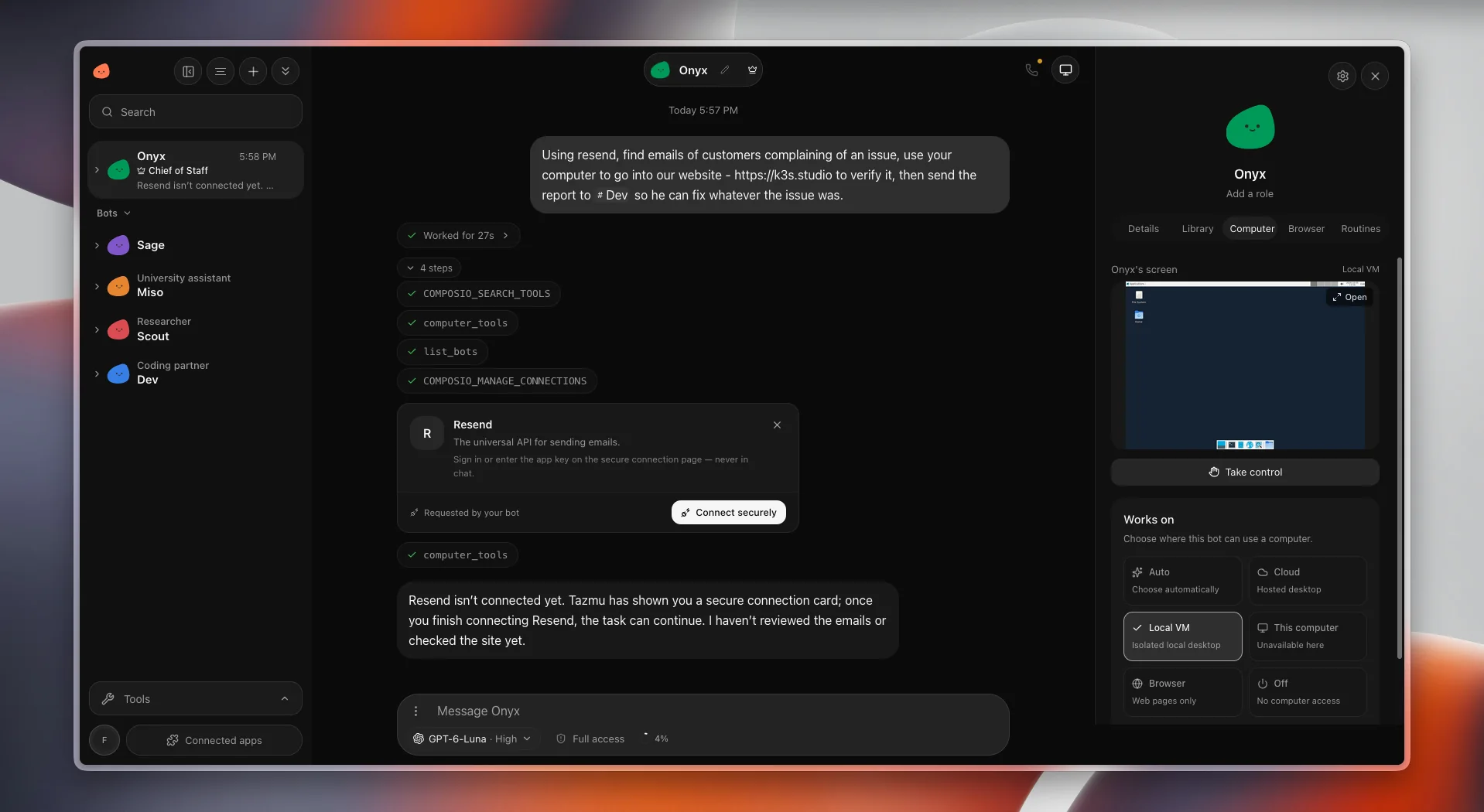
Create a bot for each kind of work, such as a chief of staff, a researcher, or a coding partner. Each one has its own role, profile, settings, and conversation history.
Give each bot a role
Name a bot, add a role, and keep it in your bot list next to the others. The role shows up wherever the bot does, so you always know who is doing what.
Choose where it can use a computer
A bot’s profile sets where it can work: a hosted cloud desktop, an isolated local virtual machine, the browser for web pages only, or no computer access at all. You can watch the bot’s screen and take control at any time.
See every step it takes
When a bot works on a task, the conversation shows how long it worked and each tool it used along the way, so you can follow its reasoning and check the result.
Pick the model and access level
Choose the AI model and reasoning level for the conversation, and decide whether the bot works with full access or asks before it acts.
Tazmu is still in development. Screenshots show a pre-release build, and details may change before launch.
Be there when Tazmu launches.
Join the waitlist and we’ll email you once when Tazmu is ready.
Join the waitlist